

To help nearby customers find your business on Apple Maps, start by checking whether your location already appears. Then use Apple Business to claim the existing listing or add a new location, complete the required verification, and make sure your business name, map pin, category, hours, phone number, and website are accurate.
A complete listing helps customers understand where you are, when you are available, and how to contact or visit you. However, claiming a business does not guarantee higher search rankings, more store visits, or additional sales.
One important update: Apple Business replaced Apple Business Connect on April 14, 2026. Apple moved existing Business Connect listing information into the new platform. The basic location-management process is available without purchasing Apple Maps advertising. Apple’s platform announcement explains the transition.
Is Apple Maps Right for Your Type of Business?
Apple Maps is especially useful to consider when customers need to visit a real business location. A restaurant, dental office, retail store, or repair shop can use its place card to provide location information that helps customers decide where to go.
Apple Business also supports organizations that operate online or provide services without a physical storefront. But an Apple Business brand profile is not the same thing as a physical place card on Maps. Apple describes place cards as representations of physical business locations.
For example, a neighborhood bakery needs an accurate storefront location and opening hours. An online-only consultant may benefit from Apple Business branding features but should not create a fictional storefront or assume that registering a brand automatically produces a map pin.
Before starting, confirm that the location you want to represent is genuine and appropriate for Apple’s location-management process. If you operate from home or serve customers only at their addresses, check your specific eligibility rather than publishing an address that customers should not visit.
How to Add or Claim Your Business on Apple Maps?
Apple’s current location setup instructions distinguish between adding a new location and claiming one that already exists. Follow the route that matches your actual business.
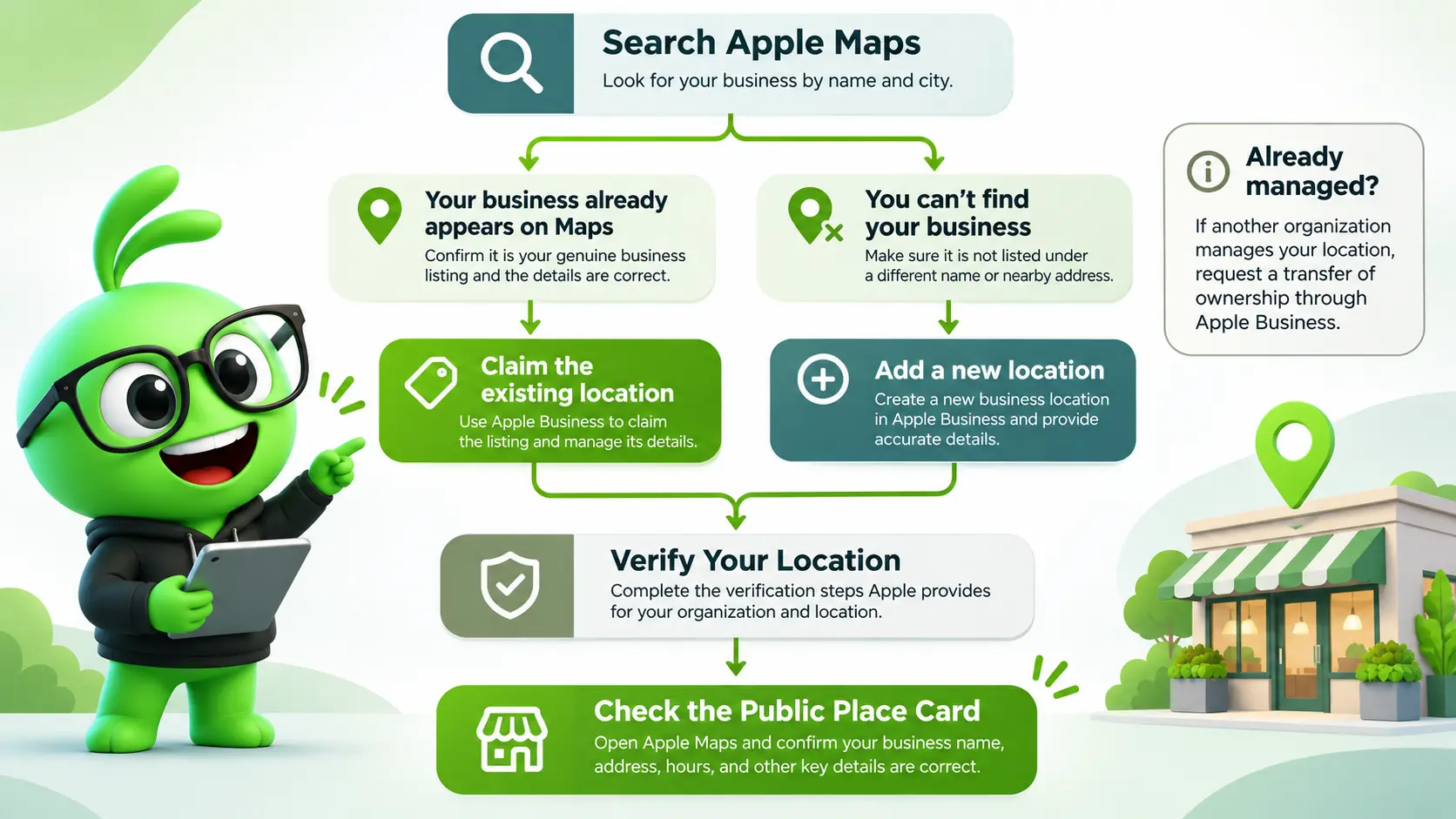
- Search Apple Maps first: Look for your business using its public name and city. Check the address before deciding whether the existing place card belongs to you.
- Open Apple Business: Visit business.apple.com and sign in or create an organization account. If you previously used Apple Business Connect, Apple provides a sign-in route for that existing account.
- Open the location management area: In the Apple Business interface, go to Brands > Locations. Select Add Location, choose Add single location, and continue.
- Choose the correct location: Search for and select your existing location, or choose to add a new location with that name if the business is genuinely missing.
- Check the location details: Place the pin over the correct building, select the appropriate primary category, provide the business phone number and website, set operating hours, and associate the location with the correct brand.
- Complete verification: Follow the verification option Apple presents for your organization and location. Review any approval or additional-information requests before treating the listing as finished.
What Does Apple Business Verification Require?
For organization verification, Apple currently requires two verification methods. Its documented options include a qualifying business identifier, domain validation, an eligible App Store Connect account, or an accepted official business document.
Apple instructs organizations to complete verification within 60 days of signing up and states that review can take up to five business days, with additional time possible. The organization verification workflow is available under Settings > Organization > Verify Now.
If an existing location is already on Maps, phone verification may be offered using the telephone number Apple has on record. If another organization manages your location, Apple provides a transfer-request process. Do not create duplicate listings simply to avoid an ownership problem.
Use Apple’s organization verification guide to confirm the available methods before submitting documents or changing domain settings.
What Should You Put on Your Apple Maps Place Card?
Your place card should answer the practical questions someone has before contacting or visiting your business. Accurate information matters more than adding promotional language to every available field.
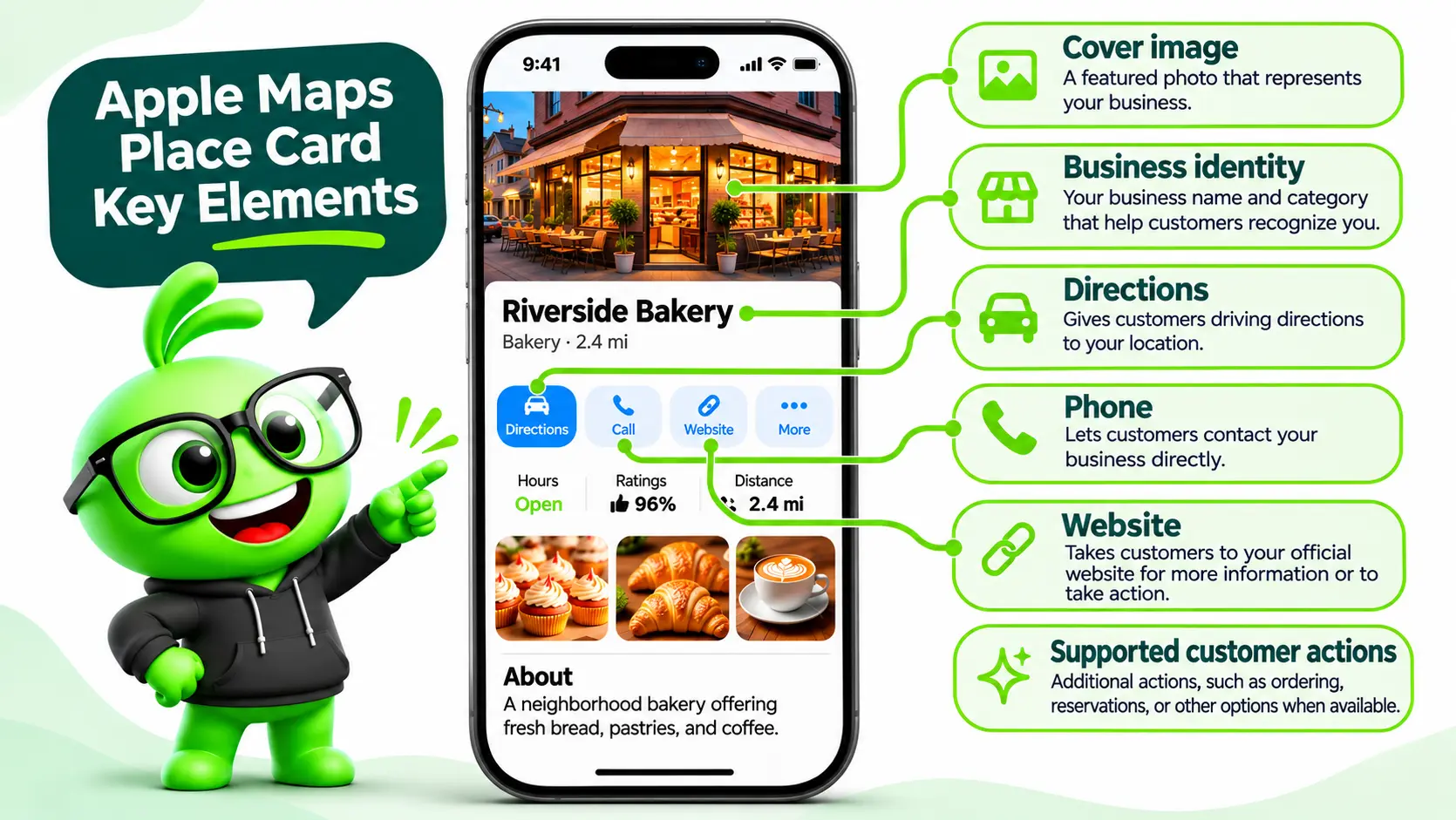
| Place Card Area | Customer Question | What to Check |
|---|---|---|
| Business identity | Is this the business I am looking for? | Use the genuine public business name and the most appropriate available primary category. |
| Location | Can I find the correct building? | Verify the street address and map pin against the actual customer-facing location. |
| Availability | Can I visit or contact this business now? | Maintain regular and special operating hours, the correct phone number, and current business status. |
| Business details | Does this location offer what I need? | Use an appropriate business website, authentic photos, useful descriptions, and eligible action links when available. |
Consider a neighborhood auto repair shop. A customer looking for a repair service may need to confirm the shop’s actual location, operating hours, contact information, and available services before deciding to visit. A correct place card helps answer those questions, even though it cannot guarantee that the shop appears for every relevant search.
Use real, representative business photos rather than misleading illustrations or unrelated images. Apple reviews submitted content and applies its own standards. The Apple Maps place card documentation explains the main information areas, photos, and supported customer actions.
How to Check Whether Nearby Customers Can Find You?
After your listing is approved, review the actual customer experience in Apple Maps rather than relying only on the information saved in your business account.
- Open Apple Maps on an iPhone and search for your exact business name and city.
- Select the place card and check the business name, address, category, phone number, website, and hours.
- Check the map pin and directions against the actual customer entrance or appropriate destination.
- Open the website link and confirm that it leads to an accurate, useful page for the business.
- Try a relevant category search near the location to observe whether and how the business appears.
That final category search is a spot check, not a controlled ranking test. What appears in one search session cannot establish your average visibility or prove how Apple orders local results.
If your listing is missing or incorrect, first investigate the location’s verification status, business information, and map position. A missing result alone is not a reason to submit another copy of the same business.
How Do You Measure Apple Maps Business Visibility?
Apple Business provides Insights for understanding how people discover and interact with business locations. Apple’s official description of Insights identifies searches, place card views, and taps on customer actions as useful signals.
These signals measure different behaviors. A search interaction is not the same as a place card view. A tap for directions is not proof of a completed store visit, and a tap on a phone number does not establish that a qualified sales conversation occurred.
For a practical review, record the reporting period, location, place card views, relevant search interactions, and available action taps. Also record when you changed hours, categories, photos, or other location details. Compare consistent reporting periods and account for seasonal demand before interpreting differences.
If you also collect website analytics or customer relationship management data, evaluate actual inquiries and confirmed business outcomes separately. Do not add together Apple Maps actions, website sessions, and qualified leads as though they were the same metric.
Do You Need Apple Maps Advertising to Get Found?
No. Claiming and maintaining an Apple Maps place card is separate from purchasing advertising. Apple Business includes location-management features, while Apple Ads provides a paid advertising option for eligible businesses and markets.
For a business with inaccurate contact details or an unclaimed location, correcting those basics is a sensible first action before evaluating paid promotion. Buying advertising should not be described as a guaranteed way to improve the organic position of a business in Apple Maps.
Evaluate paid ads separately using your target market, business goals, campaign requirements, and measurable outcomes. The existence of an Apple Maps listing does not establish that advertising is the right next investment.
When Should a Business Handle This Internally or Get Help?
A small business with one location and an owner who can access its records may be able to manage the listing directly. More complicated situations, such as multiple locations, ownership transfers, inconsistent business information, or frequent changes, may justify additional support.
Keep ownership and access arrangements clear. If you appoint a third party, confirm exactly which business information it can manage and how that access can be reviewed or removed.
Apple Maps is only one part of local discovery. Your website should also explain your real service area, offerings, and contact options. ImiliCorp’s article on organic SEO for lead generation covers how search intent, useful website pages, and clear contact paths work together.
If your broader challenge involves website search visibility and search-focused content, you can also review ImiliCorp’s SEO service scope. Confirm any Apple Business listing work separately rather than assuming it is included in a general SEO engagement.
Keep Your Apple Maps Information Accurate
Business information changes. Review your place card whenever you change your address, operating hours, telephone number, website, or customer-facing services. Pay particular attention to holidays, temporary closures, relocations, and new locations.
Getting found on Apple Maps begins with a legitimate, verified location and useful information that matches the real business. Start by claiming or adding the correct place, check what customers actually see, and use available measurement to decide what needs attention next.