
Your Instagram posts can receive hundreds of likes without generating meaningful website traffic because liking content and visiting a website are two different actions. A like shows that someone reacted to your post, but a website visit requires additional interest, a clear reason to leave Instagram, and an accessible link to follow.
If your engagement looks healthy but website traffic remains low, the problem could be your audience, content strategy, call to action, profile links, landing page, or tracking setup. Identifying where the customer journey breaks down is more useful than simply trying to get more likes.
Instagram Engagement and Website Traffic Measure Different Things
Instagram engagement helps you understand how people respond to your content within the platform. Website traffic helps you understand whether that interest leads people to explore your business outside Instagram.
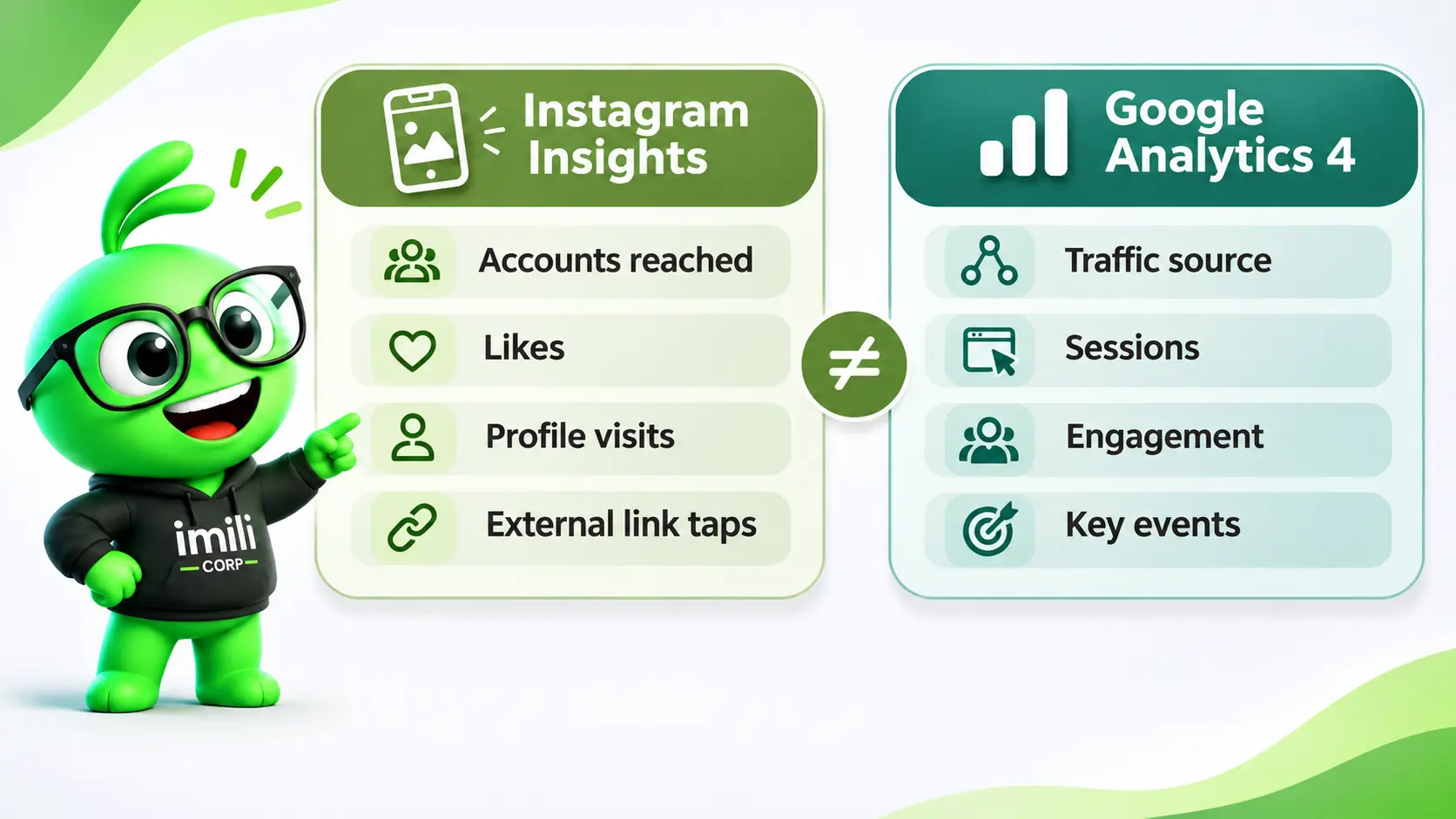
According to Meta’s Instagram Insights guidance, businesses can review content interactions, accounts reached, and profile activity to understand different aspects of audience behavior.
| Metric | What It Measures | What It Does Not Prove |
|---|---|---|
| Accounts reached | Estimated unique accounts that saw your content | Interest in buying |
| Likes | Positive reactions to content | Website visits |
| Profile visits | Visits to your Instagram profile | Clicks to your website |
| External link taps | Taps on external profile links | Successfully recorded website sessions |
| Website sessions | Periods of recorded website activity | Qualified leads or purchases |
Each metric answers a different business question. A post designed to build brand awareness can perform well without generating many clicks. However, when the objective is website traffic, likes should not be your primary measure of success.
Why Your Instagram Posts Get Likes but Few Website Visits?
Your Content Attracts Attention Without Creating Buying Interest
Entertaining videos, relatable memes, attractive photographs, and motivational posts can encourage engagement without creating interest in your products or services.
For example, a home improvement company might receive hundreds of likes on a beautiful kitchen photograph. However, a post explaining renovation options and directing readers to a project planning guide gives interested homeowners a more specific reason to visit its website.
The first post builds awareness. The second creates a clearer path toward evaluation. Both can support your marketing strategy, but they serve different objectives.
Your Posts Do Not Give People a Reason to Click
A generic call to action such as “Visit our website” does not explain what visitors will gain by leaving Instagram.
A stronger call to action connects the topic of the post with something useful on your website. Depending on your business, that could be a product collection, pricing information, a comparison guide, available appointments, or a service explanation.
Make the next step specific, relevant, and easy to understand. Avoid promising information that the destination page does not actually provide.
Your Instagram Profile Creates Unnecessary Friction
When a post directs someone to your profile, your bio and available links become part of the customer journey. Visitors may lose interest if they encounter vague descriptions, outdated promotions, too many choices, or links that do not match the content they just viewed.
Make sure your profile explains what your business offers and that your most important website destination is easy to identify. If you use a page containing multiple links, place the destination associated with your current campaign in a prominent position.
Do not assume that every URL written in a post caption is clickable. Check the linking capabilities available to your account and use supported destinations, such as profile links or eligible Story link stickers.
Your Engaged Audience May Not Be Your Target Customer
A business can attract attention from people who enjoy its content but have little interest in purchasing its products or services.
For instance, a landscaping company serving Dallas may receive engagement from gardening enthusiasts across several countries. That attention can support awareness, but it does not necessarily represent local demand for landscaping services.
Where audience insights are available, review geographic relevance alongside content engagement. Consider whether your posts address the problems, questions, and purchasing decisions of customers you can realistically serve.
Find Where Your Instagram-to-Website Journey Breaks Down
Instead of changing your entire social media strategy at once, identify the stage where interest stops turning into action.
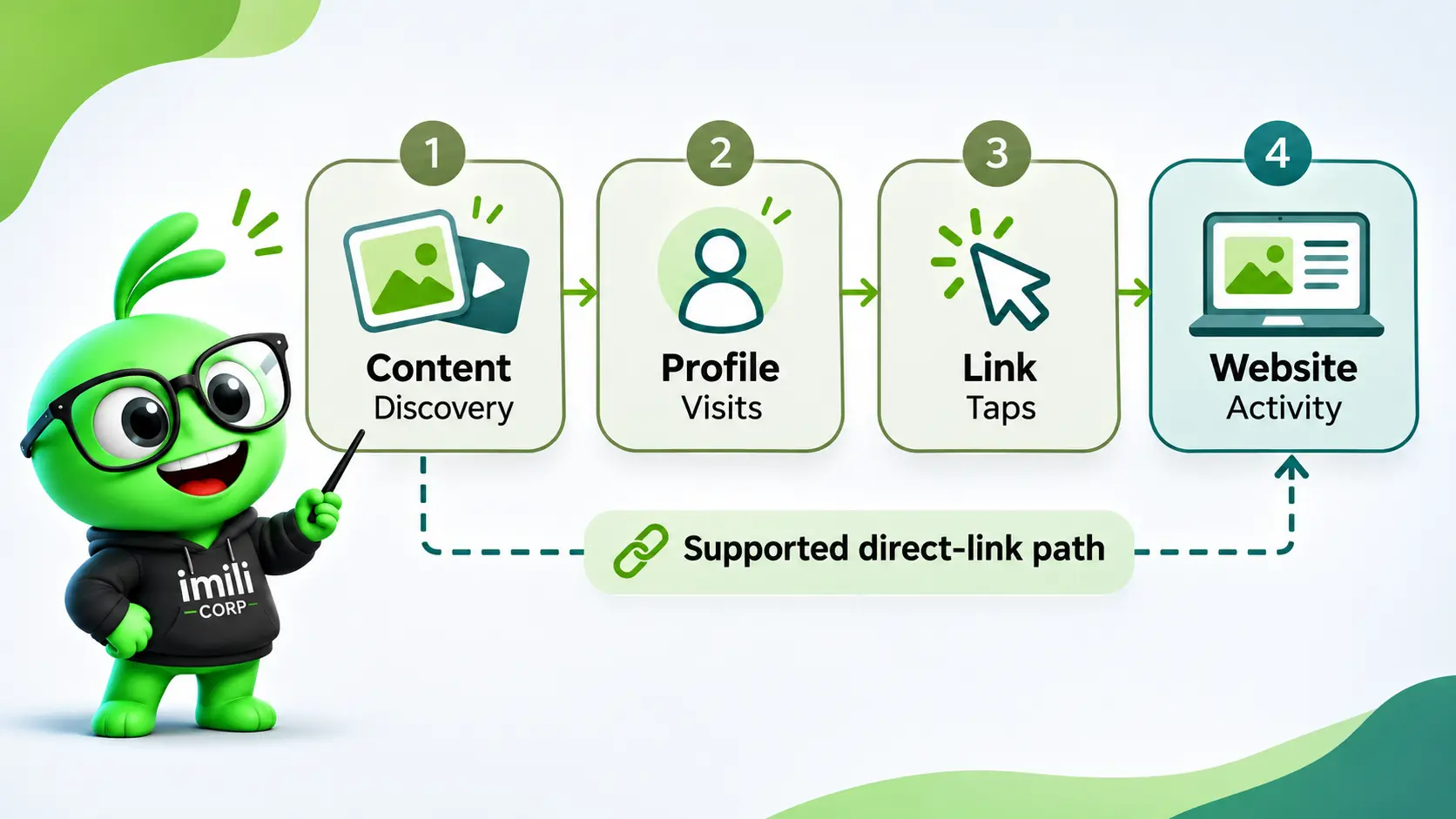
A common profile-based journey begins with content discovery, continues through a profile visit and link tap, and ends with recorded website activity and a possible business outcome. Story links and other supported direct links can bypass the profile stage.
| What You Observe | Possible Problem | What to Check First |
|---|---|---|
| Many likes but few profile visits | Content generates reactions without encouraging further exploration | Audience relevance and post calls to action |
| Many profile visits but few link taps | The profile does not provide a compelling next step | Bio, link descriptions, and destination relevance |
| Many link taps but few recorded sessions | Page-loading, redirect, or measurement problems | Destination URL, campaign tags, mobile loading, and analytics setup |
| Website sessions but few inquiries or purchases | Traffic quality, landing-page relevance, or conversion friction | Offer, page content, forms, and checkout experience |
These patterns suggest what to investigate rather than proving a particular cause. Review comparable reporting periods, separate paid and organic activity where possible, and avoid treating aggregate platform metrics as a record of individual customer journeys.
How to Turn Instagram Engagement Into Website Traffic?
Create Content That Connects With Customer Decisions
Develop posts around questions your potential customers ask before making a decision. Product comparisons, service explanations, demonstrations, availability information, and practical advice can create natural opportunities for further exploration.
Retail businesses can also use helpful content rather than relying entirely on promotional messages. Our guide to content ideas that bring local shoppers back explains how buying guidance and relevant customer information can support repeat visits.
Use Clear Calls to Action and Relevant Destinations
Give each traffic-focused post one main action. The link destination should fulfill the expectation created by the content.
| Business Type | Generic CTA | More Specific CTA |
|---|---|---|
| Online clothing store | Visit our website | Explore the featured collection through our profile link |
| Home services company | Learn more | See our service options and request an estimate |
| Furniture retailer | Check us out | Compare sofa dimensions and available finishes |
These examples assume the corresponding destination exists and is accessible through the indicated link. Adapt the wording to your actual offer and available Instagram features.
Use Instagram Stories to Provide a Shorter Click Path
When link stickers are available to your account, Instagram Stories can provide a direct route to a relevant website page without requiring visitors to navigate through your profile first.
Use Stories to expand on feed content, highlight useful resources, or present a product or service with a clear next step. Meta’s Instagram Stories guidance explains how professional accounts can review Story performance and test different content formats and interactive elements.
Match the Landing Page to the Promise of the Post
Sending every Instagram visitor to your homepage can create unnecessary work for people who already know what they want to explore.
If a post promotes a particular collection, link to that collection. If it explains a service, direct interested visitors to the relevant service page. If it offers an appointment, make the booking information easy to find.
Open the destination on a mobile device and check whether it loads correctly, communicates the promised information, and provides an obvious next action. A successful link tap is only the beginning of the website experience.
How to Track Instagram Website Traffic With GA4?
Instagram Insights and Google Analytics 4 measure activity at different points in the customer journey. Use both to distinguish a lack of clicks from a website measurement problem.
Step 1: Review Instagram Insights
Using a professional Instagram account, open the Professional dashboard and review the available account and content insights. Record accounts reached, likes, profile visits, and relevant external link or Story link activity for your chosen reporting period.
Metric names and navigation can vary across account types, app versions, and available features. Check the definition displayed for each metric before comparing results.
Step 2: Add UTM Parameters to Website Links
UTM parameters identify the marketing source and campaign associated with a website link. Google’s campaign URL guidance explains how manually tagged URLs make campaign information available in Analytics reports.
The following fictional URL illustrates how an organic Instagram profile link could be tagged:
https://example.com/collections/summer?utm_source=instagram&utm_medium=social&utm_campaign=summer_collection&utm_content=bio_link
- utm_source: Identifies Instagram as the traffic source.
- utm_medium: Identifies the marketing medium.
- utm_campaign: Identifies the marketing campaign.
- utm_content: Distinguishes a particular link placement or content variation.
For a Story promoting the same collection, you could use a different content value, such as story_link. Keep naming consistent and include other relevant campaign parameters when needed. Do not include customer names, email addresses, or other personal information in campaign URLs.
Step 3: Review the Traffic Acquisition Report
In GA4, navigate to Reports, then Acquisition, then Traffic acquisition. Review the Session source / medium dimension and look for the Instagram traffic associated with your tagging convention.
Google’s Traffic acquisition report documentation explains the session-level traffic dimensions available for this analysis. If the report is missing from your navigation, it may need to be restored by someone with appropriate editing permissions.
Review sessions, engagement, and relevant key events. Use actual inquiry, booking, or purchase records to assess business outcomes rather than assuming every visit represents a potential customer.
Step 4: Investigate Differences Between Link Taps and Sessions
Instagram link taps and GA4 sessions should not be expected to match exactly. A person may tap a link more than once, close the page before tracking occurs, or already have an active website session.
Missing campaign parameters, redirects, consent settings, analytics implementation errors, privacy tools, and reporting delays can also affect what appears in your reports.
Test the actual destination link from Instagram and confirm that the expected campaign parameters survive any redirects. Google’s Analytics troubleshooting guidance explains how to use Realtime and DebugView to verify data collection. Respect the website visitor’s privacy choices during testing.
A Practical Example of Diagnosing Low Instagram Traffic
Consider the following hypothetical results for an organic Instagram account over 14 days. These figures are illustrative, not industry benchmarks or actual client results.
| Metric | Illustrative Result |
|---|---|
| Accounts reached | 20,000 |
| Likes | 1,200 |
| Profile visits | 400 |
| External profile link taps | 40 |
| Recorded sessions attributed to the tagged profile link | 30 |
Dividing 400 profile visits by 20,000 accounts reached gives an activity ratio of 2%. Dividing 40 external link taps by 400 profile visits gives a link-tap-to-profile-visit ratio of 10%.
These are aggregate activity ratios, not verified percentages of individual users progressing through a funnel. Reach counts accounts, while profile visits and link taps can include repeated actions.
The business could investigate whether its content encourages enough relevant profile exploration and whether its profile provides a compelling reason to click. It should also check the difference between 40 link taps and 30 attributed sessions without assuming that exactly 10 visitors were lost.
Build a Repeatable Instagram Traffic Strategy
Start with a manageable test rather than trying to improve every metric simultaneously. Choose a customer question, create content that addresses it, provide a relevant website destination, and use a consistently tagged link.
Compare results across similar reporting periods and content formats. Change one major element at a time where practical, such as the call to action, destination page, or content angle. Small samples and differences in audience exposure can make results inconclusive, so look for consistent patterns rather than declaring a winner from one post.
If your team needs help coordinating content strategy, social media activity, and website improvements, explore IMILI Corp’s digital marketing services to understand the available service areas.
The goal is not to eliminate content that earns likes. It is to build a balanced Instagram strategy in which awareness content introduces your business, decision-focused content gives people a reason to explore it, and reliable measurement shows whether that interest develops into meaningful website activity. Fix the weakest part of that journey before investing in more content or additional promotion.