
A redesign can improve speed, usability, and conversions, but it can also erase years of search visibility if SEO details get lost in the process. The safest approach is to treat SEO as a core requirement, not a post-launch task. This guide outlines what to protect, what to change carefully, and how to launch without losing organic traffic.
Why Website Redesigns Often Cause Traffic Drops?
Most redesign-related traffic losses come from changes search engines interpret as removed or weakened pages. When URLs change without proper redirects, Google can deindex old pages and fail to transfer ranking signals. When templates change, internal links, headings, and structured content can also shift in ways that reduce relevance.
Technical changes create additional risk. New platforms can alter indexability settings, canonical tags, robots rules, and site speed. Even small mistakes across many pages can compound into a major visibility decline.
Set Redesign Goals Without Sacrificing Search Performance
Start by defining what success looks like beyond visuals. A redesign should support business outcomes and keep organic acquisition stable. Align design, development, and content teams around a shared set of SEO and conversion goals.
It helps to document non-negotiables such as keeping high-performing pages live, preserving intent-focused content, and maintaining crawl access for key sections. If you need support bridging brand, UX, and SEO requirements, IMILI can provide strategy-led redesign guidance so design choices do not unintentionally reduce search performance.
Run A Pre-Redesign SEO Audit And Content Inventory
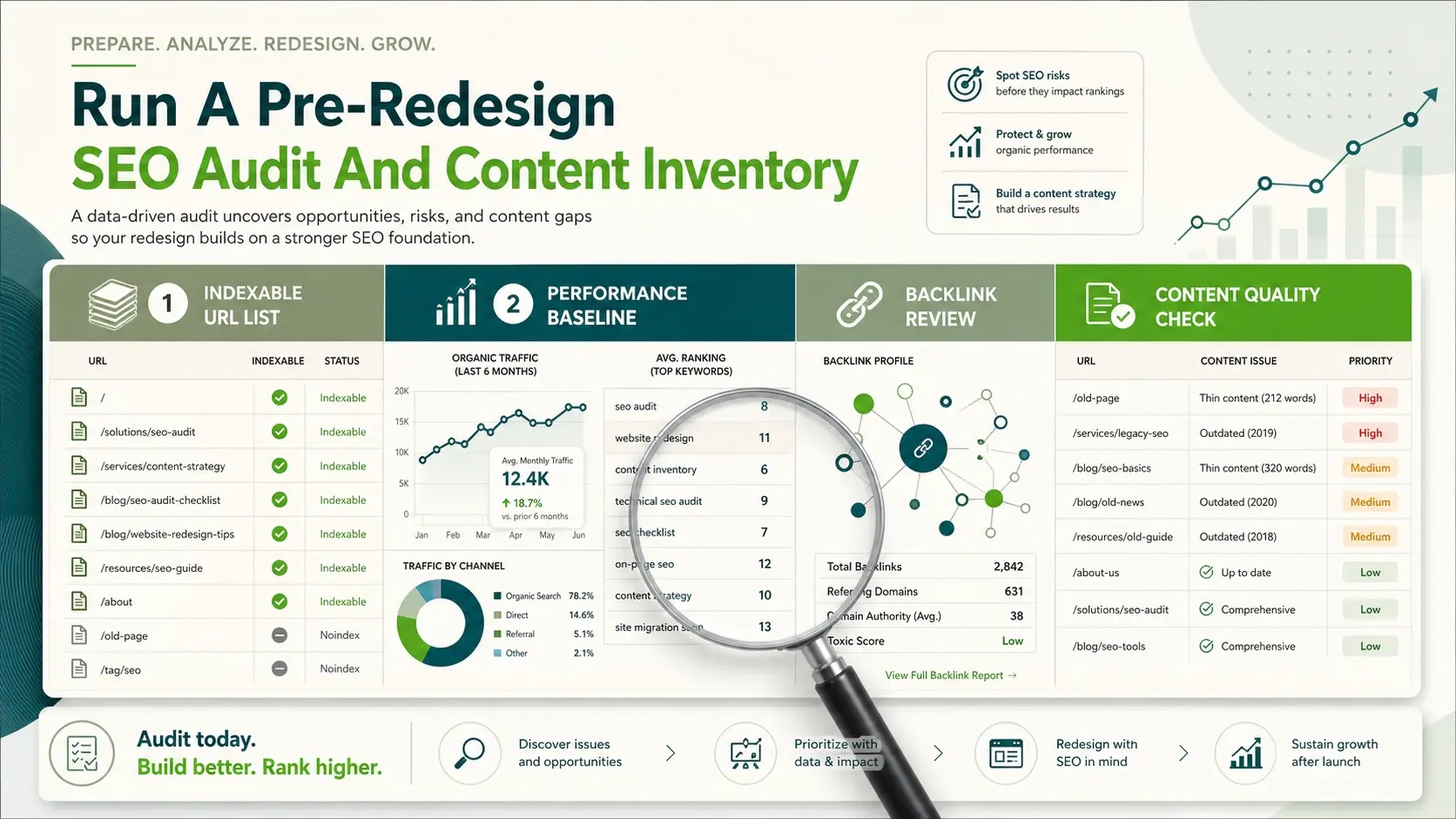
Before anything changes, capture a complete snapshot of what is already working. This includes top landing pages, queries, backlinks, internal link pathways, and pages that drive leads or sales. The goal is to protect your highest-value assets first.
Build a content inventory that lists every indexable URL and its purpose. Include title tags, primary topic, traffic, conversions, backlinks, and whether the page will be kept, merged, improved, or retired.
- Indexable URL List: Export all live URLs and confirm which are intentionally available to search engines.
- Performance Baseline: Record organic sessions, conversions, rankings, and top pages so you can compare after launch.
- Backlink Review: Identify pages with strong referring domains so those URLs are preserved or redirected correctly.
- Content Quality Check: Flag thin, outdated, or overlapping pages for consolidation rather than deletion.
Once the inventory is complete, you can redesign with clear guardrails instead of guessing which pages matter.
Plan Your URL Structure And Redirects Early
URL changes are the most common reason rankings disappear after a redesign. If you must change URLs, map every old URL to the best new destination. A one-to-one redirect plan transfers equity and reduces crawl errors.
Keep structures consistent where possible. If a section is reorganized, ensure the new hierarchy still supports how users search, not only how the menu looks.
- Preserve High-Value URLs: Keep URLs for top-performing pages unless there is a clear reason to change them.
- Use 301 Redirects: Permanently redirect retired or moved pages to the closest relevant replacement.
- Avoid Redirect Chains: Redirect old URLs directly to the final page to reduce latency and crawl waste.
- Prevent Soft 404s: Do not redirect unrelated pages to the homepage because it weakens relevance.
Redirect mapping is also a quality control tool. If you cannot find a suitable new destination for a page, it may signal the redesign is removing a topic users still need.
Protect On-Page SEO Elements During Template Changes
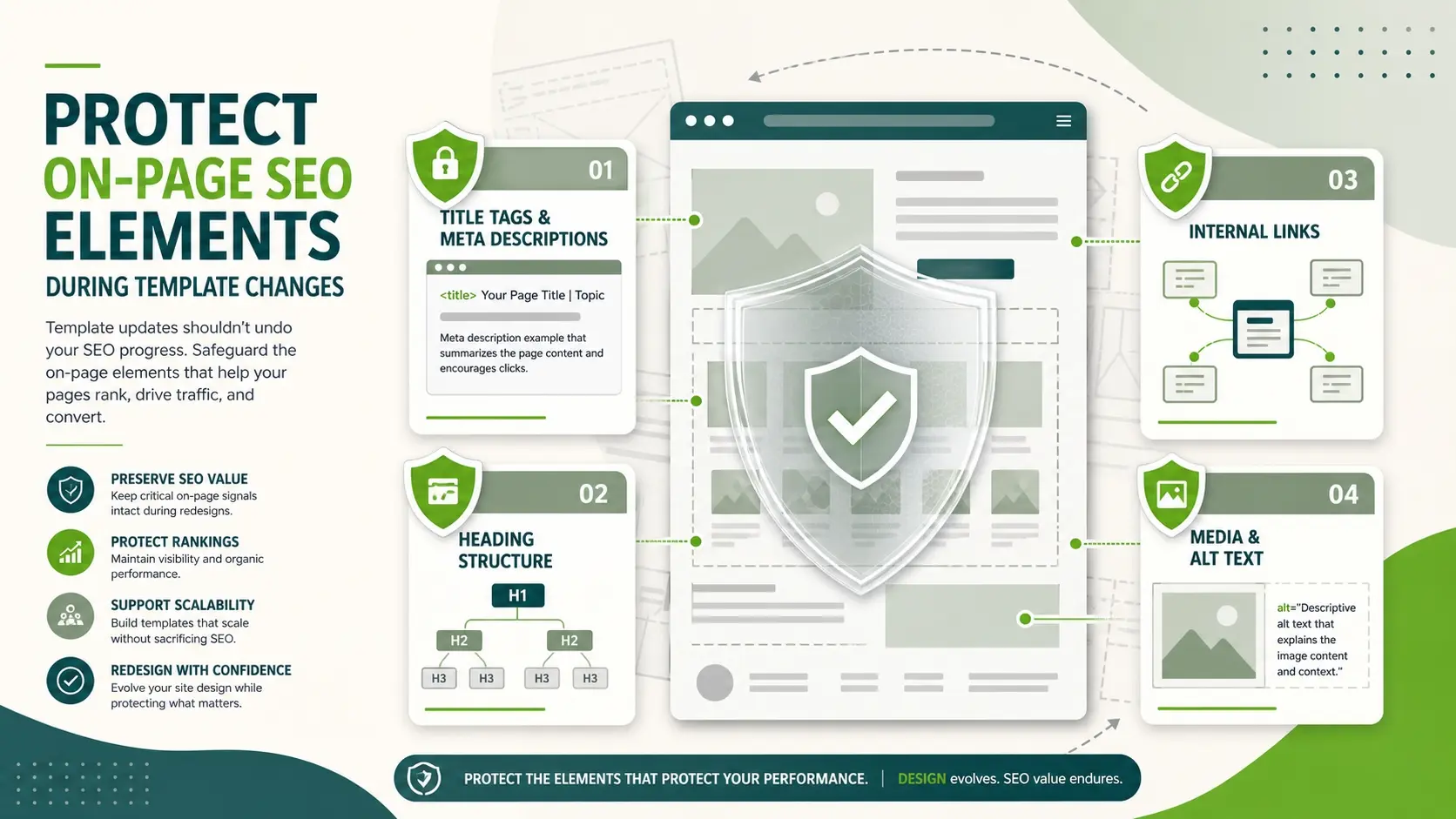
Redesigns often introduce new templates that change headings, layout, and content placement. Those changes can accidentally weaken keyword relevance and topical clarity. Keep key on-page elements stable unless you have a clear improvement plan.
Make sure every primary page keeps a unique title tag, a single clear H1, and supporting H2 headings that match real search intent. Avoid hiding valuable copy behind tabs that are difficult to crawl, and ensure important content remains in the HTML.
- Title Tags And Meta Descriptions: Keep strong pages consistent and improve weak ones with clearer intent and branding.
- Heading Structure: Maintain a logical hierarchy so both users and search engines can scan the page.
- Internal Links: Preserve links that pass authority to key pages and ensure anchors describe the destination.
- Media And Alt Text: Keep image relevance and accessibility signals intact, especially on high-traffic pages.
When design teams change components like cards, accordions, or sliders, confirm those elements do not remove text content that supports rankings.
Maintain Technical SEO And Crawlability
Technical SEO issues can appear when migrating to a new CMS, changing themes, or adding new plugins. Validate that the new site is crawlable, indexable, and consistent across devices. A redesigned site should improve performance, not introduce hidden blockers.
Pay attention to robots rules, canonical tags, pagination, and parameter handling. Confirm that staging environments are blocked, but the live site is open for crawling and indexing.
| Technical Check | What To Verify | Risk If Missed |
|---|---|---|
| Robots And Indexing | Robots.txt allows key sections and meta robots tags are correct | Pages drop from the index or never get indexed |
| Canonical Tags | Canonicals point to the preferred URLs and do not self-sabotage | Duplicate signals split rankings or wrong pages rank |
| Core Web Vitals | LCP, INP, and CLS improve or stay stable after design changes | Lower engagement and potential visibility loss on competitive terms |
| Sitemaps And Status Codes | XML sitemap lists final URLs and all key pages return 200 status | Crawl inefficiency and indexing delays |
Technical checks become easier when they are part of your build process, not a rushed task the day before launch.
Prepare Analytics And Tracking Before Launch
A redesign is the moment when tracking often breaks. If analytics and tags fail, you lose the ability to diagnose performance drops and measure recovery. Confirm tracking on staging and re-validate after launch.
Ensure key events and conversions still fire correctly. Maintain consistent UTM handling, referral exclusions, and cross-domain settings if applicable.
- Analytics Tag Validation: Confirm pageviews and events trigger on all templates and key user flows.
- Search Console Setup: Verify the correct property, sitemap submission, and coverage monitoring.
- Conversion Tracking: Re-test forms, calls, checkout, and lead captures to confirm accurate reporting.
If the redesign changes domains, subdomains, or protocol settings, create a measurement plan before the migration begins.
Use A Staging Environment With SEO Guardrails
Staging helps you test design and functionality, but it also creates SEO risks if it becomes indexable. Keep staging blocked from indexing and crawling using the right combination of authentication and robots rules. Confirm it cannot be reached through internal links on the live site.
At the same time, staging should be realistic enough to test redirects, templates, metadata, and performance. Run crawls and fix issues while the site is still private.
Launch With A Controlled SEO Checklist
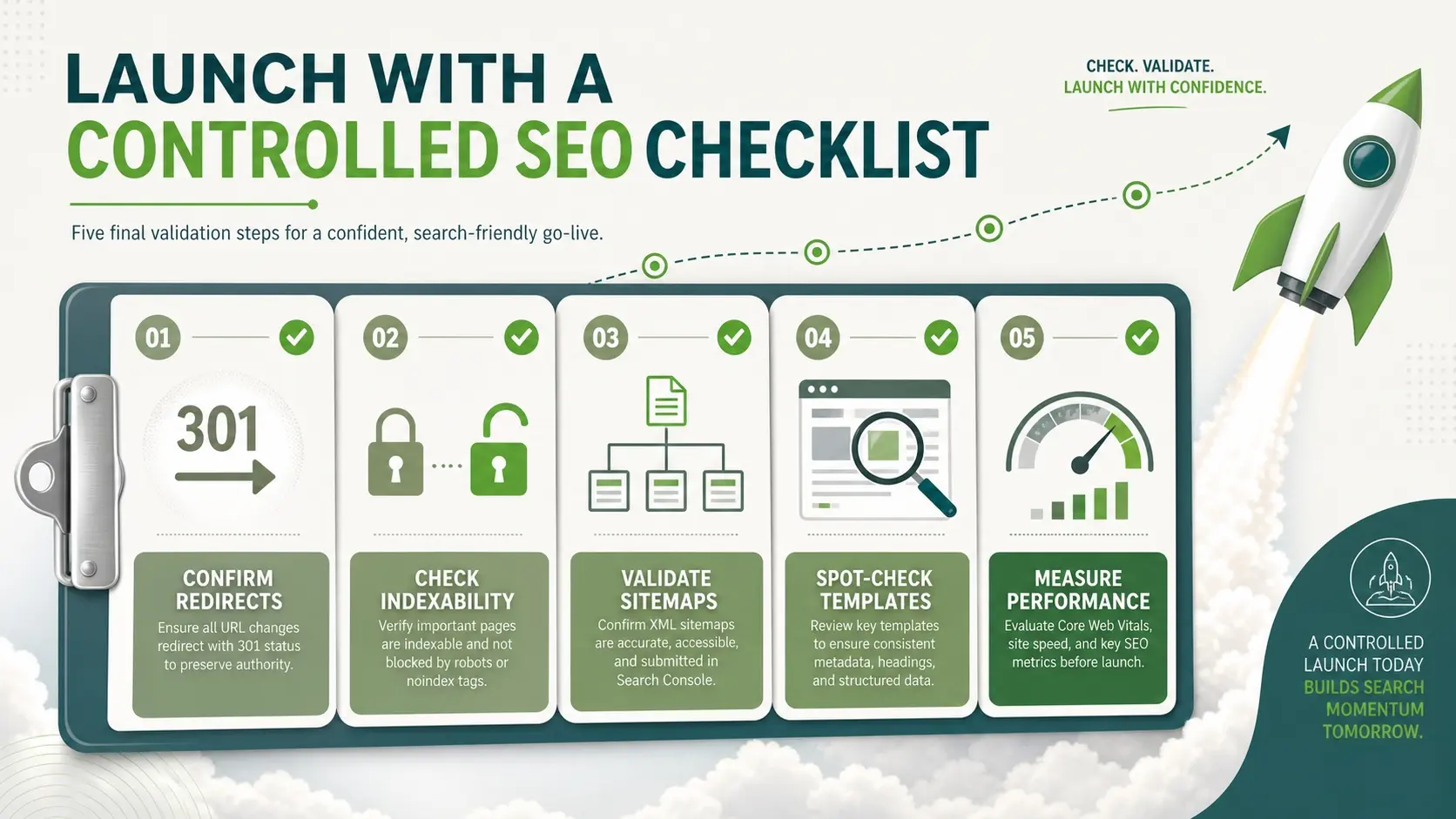
Plan a launch sequence that includes final SEO validations. Avoid making additional structural changes on launch day. Freeze content and URL decisions early so your team can focus on quality checks and stability.
- Confirm Redirects: Test critical old URLs and verify they resolve to the correct new pages with 301 status.
- Check Indexability: Ensure the live site is not blocked by noindex tags or restrictive robots rules.
- Validate Sitemaps: Submit the updated XML sitemap and confirm it includes only final canonical URLs.
- Spot-Check Templates: Review titles, headings, internal links, and core content blocks on key pages.
- Measure Performance: Monitor speed and server response times during peak crawl and user activity.
A controlled checklist reduces panic and gives you clean data when comparing pre-launch and post-launch performance.
Monitor And Recover After The Redesign
Expect some volatility after launch, especially if many URLs changed or content was consolidated. What matters is whether key pages reindex quickly and regain impressions. Daily monitoring in the early phase helps you catch issues while they are still easy to fix.
Track coverage reports, crawl errors, redirect behavior, and ranking movements for your top pages. Watch server logs if available to confirm search engines can crawl important sections efficiently.
- 404 And 500 Errors: Fix broken pages and server issues before they affect crawl budget and user trust.
- Redirect Accuracy: Correct mismapped redirects that send users to irrelevant pages or outdated sections.
- Content Gaps: Restore missing sections that supported rankings for high-intent queries.
- Internal Link Updates: Replace legacy links so the site does not rely on redirects for navigation.
If organic traffic does not stabilize, a deeper technical and content review is often needed. IMILI can support post-launch SEO monitoring and remediation, especially when a redesign involves platform changes or multi-section migrations.
Conclusion
A redesign should strengthen your brand and user experience without sacrificing the SEO equity you have earned. Protect performance by auditing first, mapping redirects early, preserving on-page signals, and validating technical SEO before launch. Then monitor closely and fix issues quickly while search engines are recalibrating your site.
When SEO is embedded into the redesign workflow, organic traffic becomes a protected asset instead of a gamble. A structured plan also helps your team launch with confidence and measurable outcomes.
Frequently Asked Questions
Do I Need To Change URLs During A Website Redesign?
Most redesigns do not require URL changes, and keeping stable URLs is often the safest option for SEO. If you do change them, map each old URL to the closest relevant new page with a 301 redirect. This helps preserve ranking signals and avoids broken links.
How Long Does It Take For SEO Traffic To Stabilize After A Redesign?
Stabilization depends on how many pages changed, how well redirects were implemented, and whether content intent stayed consistent. Minor redesigns can settle quickly, while larger migrations may take longer as pages are re-crawled and reindexed. Consistent monitoring helps you shorten recovery time by catching issues early.
What Should I Test On The New Site Before Going Live?
Focus on indexability, redirects, metadata, internal links, and page speed. Confirm analytics and conversion tracking work correctly across templates and devices. Also verify the XML sitemap and canonical tags reflect the final live URLs.