

Good content should earn attention, trust, and conversions. Yet when the website design works against the reader, even the strongest message loses momentum. The result is a quiet failure where visitors leave, search engines hesitate, and performance data stays flat.
Design And Content Must Work As One
Content carries meaning, but design controls how that meaning is received. Layout, spacing, contrast, and interaction patterns determine whether readers can process information without effort. If the experience feels confusing, people blame the brand, not the interface.
Search engines also evaluate user satisfaction signals. When visitors pogo-stick back to results or abandon pages quickly, rankings can drop even if the writing is excellent. Design becomes a silent ranking factor through behavior.
Slow Page Speed Breaks Attention
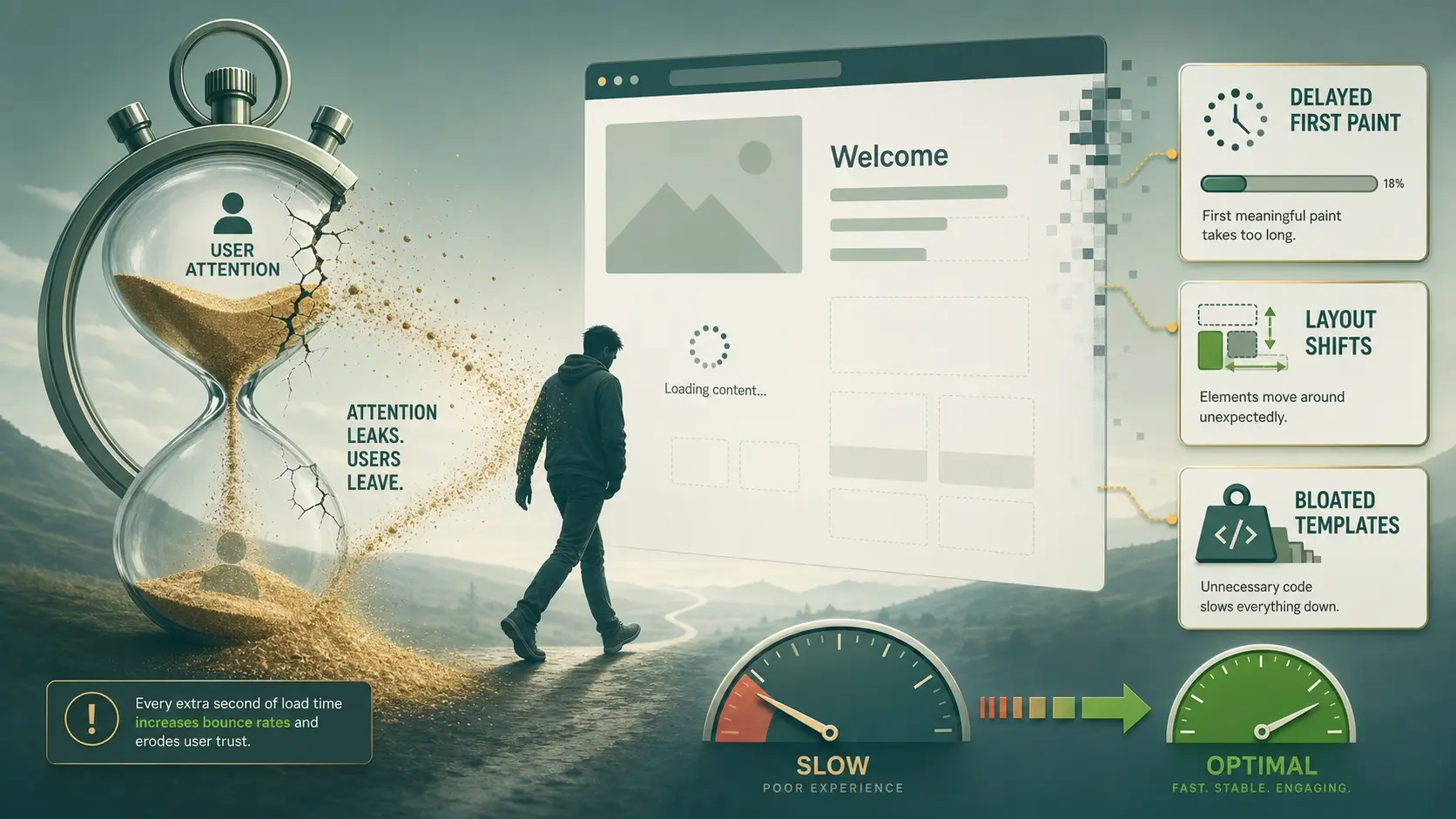 Speed is the first impression your content makes. If the page takes too long to load, users never reach the headline, let alone the deeper sections. A slow site also increases bounce rate and reduces pages per session.
Performance issues often come from heavy themes, uncompressed images, excessive scripts, and poor hosting choices. Content teams can publish consistently and still see weak results if technical performance is ignored.
- Delayed First Paint: Visitors perceive the site as unreliable and back out before engaging.
- Layout Shifts: Moving elements disrupt reading and lead to accidental clicks that frustrate users.
- Bloated Templates: Extra code slows every page, including blog posts meant to attract organic traffic.
Once speed is stable, every article has a fair chance to be read and shared.
Poor Navigation Hides Great Information
Readers need clear pathways to find related answers. When menus are cluttered, internal links are inconsistent, or categories make no sense, content becomes difficult to discover. That reduces time on site and weakens topical authority.
Navigation should match user intent, not internal department structure. Clear labels and predictable placement support both new visitors and returning users. It also helps search engines understand your site architecture.
Weak Visual Hierarchy Makes Reading Hard
Even strong writing fails when the page looks like a wall of text. Visual hierarchy uses headings, spacing, typography, and emphasis to guide the eye. Without it, readers cannot scan, prioritize, or stay oriented.
Common problems include tiny font sizes, low contrast, long line lengths, and too many competing callouts. These issues increase cognitive load and shorten sessions. Users may leave before reaching the sections that would have convinced them.
Mobile Usability Issues Destroy Engagement
Most content consumption happens on mobile devices. If the mobile layout has cramped text, overlapping elements, or buttons that are hard to tap, users quit quickly. A mobile-first experience is no longer optional for SEO or conversions.
Mobile issues also affect perceived professionalism. When a site feels broken on a phone, trust drops even if the information is accurate. That loss of confidence can reduce form submissions, calls, and purchases.
Trust Signals Are Missing Or Inconsistent
Good content can educate, but design establishes credibility. If the website lacks clear branding, consistent styling, and visible business details, readers hesitate to take action. Trust is also impacted by intrusive popups, excessive ads, and confusing consent banners.
Key trust elements should be easy to find. This includes contact information, clear policies, secure checkout indicators when relevant, and a professional visual system. When these are hidden or inconsistent, content performance suffers.
- Unclear Brand Identity: Inconsistent colors and typography make the site feel pieced together.
- Hard To Find Contacts: Visitors may not convert if they cannot quickly confirm legitimacy.
- Aggressive Interruption: Popups that block reading reduce trust and increase exits.
When trust is visible, content can do its job and move users toward the next step.
SEO Structure Breaks When Design Ignores It
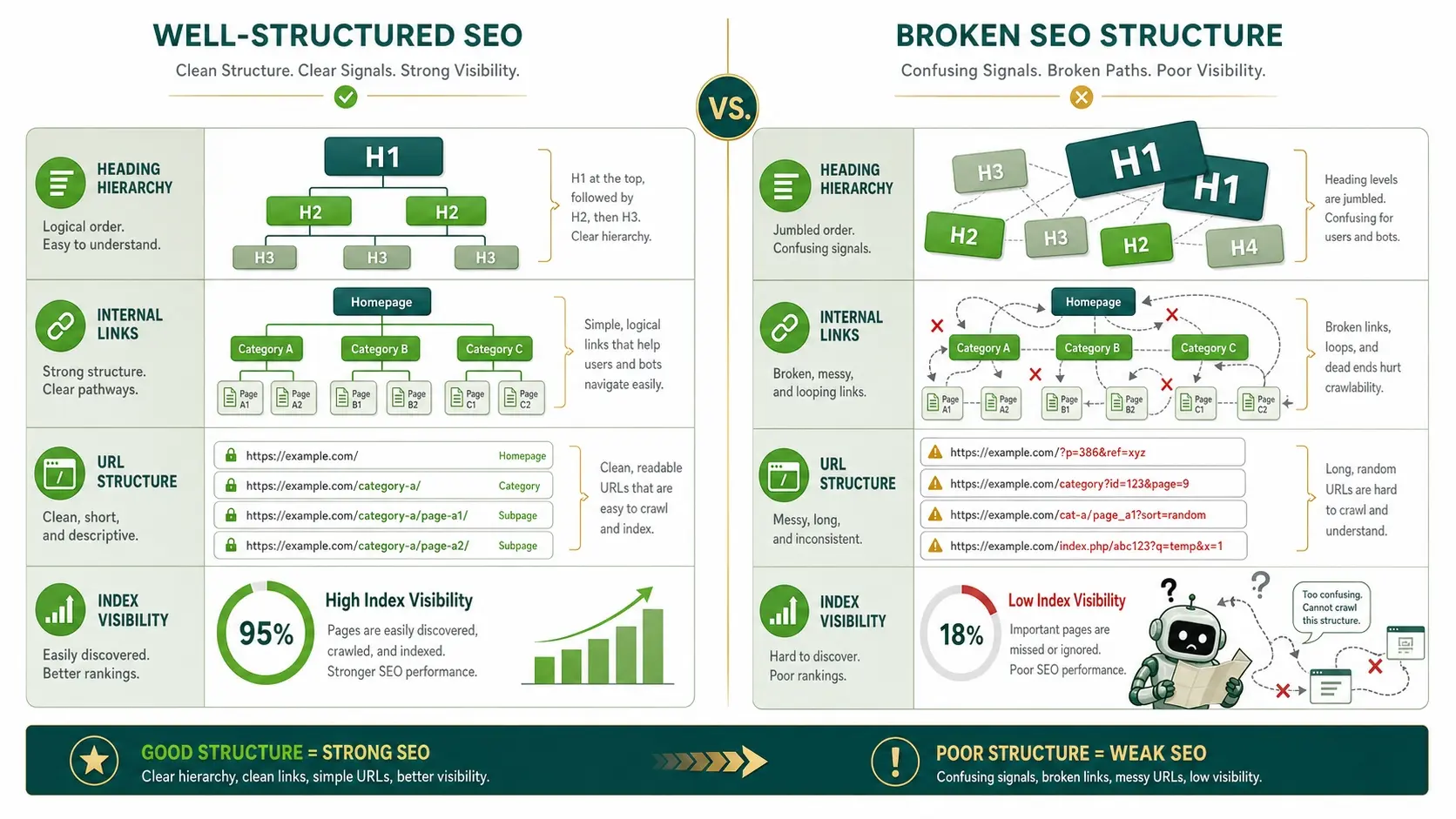 Great writing still needs a strong technical foundation. If templates generate messy HTML, duplicate headings, or thin pages, your content may be harder to index and rank. Design decisions can also block crawling through poor internal linking or confusing URL structures.
Structured content presentation matters. Proper heading levels, clean typography, and accessible components support both humans and search engines. When design overrides these fundamentals, content visibility declines.
Conversion Paths Are Confusing Or Distracting
 Content often aims to drive action, such as subscribing, booking, or requesting a quote. A poorly designed website can bury calls to action, make forms painful, or send users to dead ends. If the next step is unclear, even interested visitors disengage.
Design should reduce friction and make decisions easy. That means clear button styling, short forms, and consistent placement of key actions. It also means removing distractions that compete with the primary goal of the page.
Content And Design Alignment Checklist
When content underperforms, teams often publish more instead of fixing experience barriers. A short audit usually reveals whether the issue is writing quality or delivery quality. The goal is to make content readable, discoverable, fast, and trustworthy.
| Issue | What Visitors Experience | What To Fix |
|---|---|---|
| Slow Load Times | They leave before reading | Compress assets and reduce scripts |
| Cluttered Layout | They cannot scan the page | Improve spacing and typography |
| Confusing Navigation | They cannot find related pages | Simplify menus and strengthen internal links |
| Weak Mobile Experience | They struggle to tap and read | Use responsive design and test on devices |
This kind of alignment work often produces faster gains than publishing additional articles.
How To Fix A Poorly Designed Website Without Losing Content?
A redesign does not need to reset your entire content library. The best approach preserves what already works and improves delivery. That means focusing on templates, navigation, performance, and accessibility first.
- Measure User Behavior: Review bounce rate, scroll depth, and conversion paths to see where engagement breaks.
- Improve Core Templates: Fix typography, spacing, and heading structure on the blog and key landing pages.
- Optimize Performance: Reduce code bloat, compress images, and validate mobile speed across templates.
- Strengthen Site Architecture: Clarify categories, add meaningful internal links, and make navigation predictable.
- Design Clear Actions: Use consistent calls to action and simplify forms so readers can act without friction.
After these changes, content results become easier to evaluate because the experience no longer blocks performance.
When To Bring In A Professional Team?
Some issues require more than small tweaks. If the site has deep performance problems, inconsistent branding, or complicated integrations, a professional web team can shorten the path to measurable improvement. A reliable partner also helps protect SEO during design changes.
If you need support with web design, development, and digital optimization, Imili Corp can help align your site experience with your content goals. Their approach is especially useful when you want better performance without sacrificing clarity, usability, or brand credibility.
Conclusion
Good content fails on a poorly designed website because delivery shapes perception, engagement, and trust. Speed, navigation, mobile usability, hierarchy, and conversion paths determine whether readers stay long enough to absorb your message. Fix the experience, and your content becomes easier to find, easier to read, and far more likely to convert.
Frequently Asked Questions
Can a website redesign hurt SEO even if the content stays the same?
Yes, a redesign can hurt rankings if URLs change, internal links break, or templates alter heading structure and indexability. A careful migration plan and SEO checks protect performance while improving usability.
What is the fastest design fix that improves content performance?
Page speed improvements usually show benefits quickly because they reduce abandonment before reading begins. Cleaning up typography and spacing is another fast win that makes pages easier to scan and finish.
How do I know if the problem is my content or my website design?
If users click in but leave quickly, struggle on mobile, or do not reach key sections, design and performance are likely blocking engagement. If readers stay and scroll but do not convert, the content offer and call to action may need refinement.