

Lead volume can look healthy in Google Ads while sales conversations feel like dead ends. The gap usually comes from weak lead quality signals, misaligned targeting, or a conversion setup that rewards the wrong actions. When you diagnose quality at the same level as cost per lead, you protect budget and make sales outcomes more predictable.
What Right Leads Mean For Your Business?
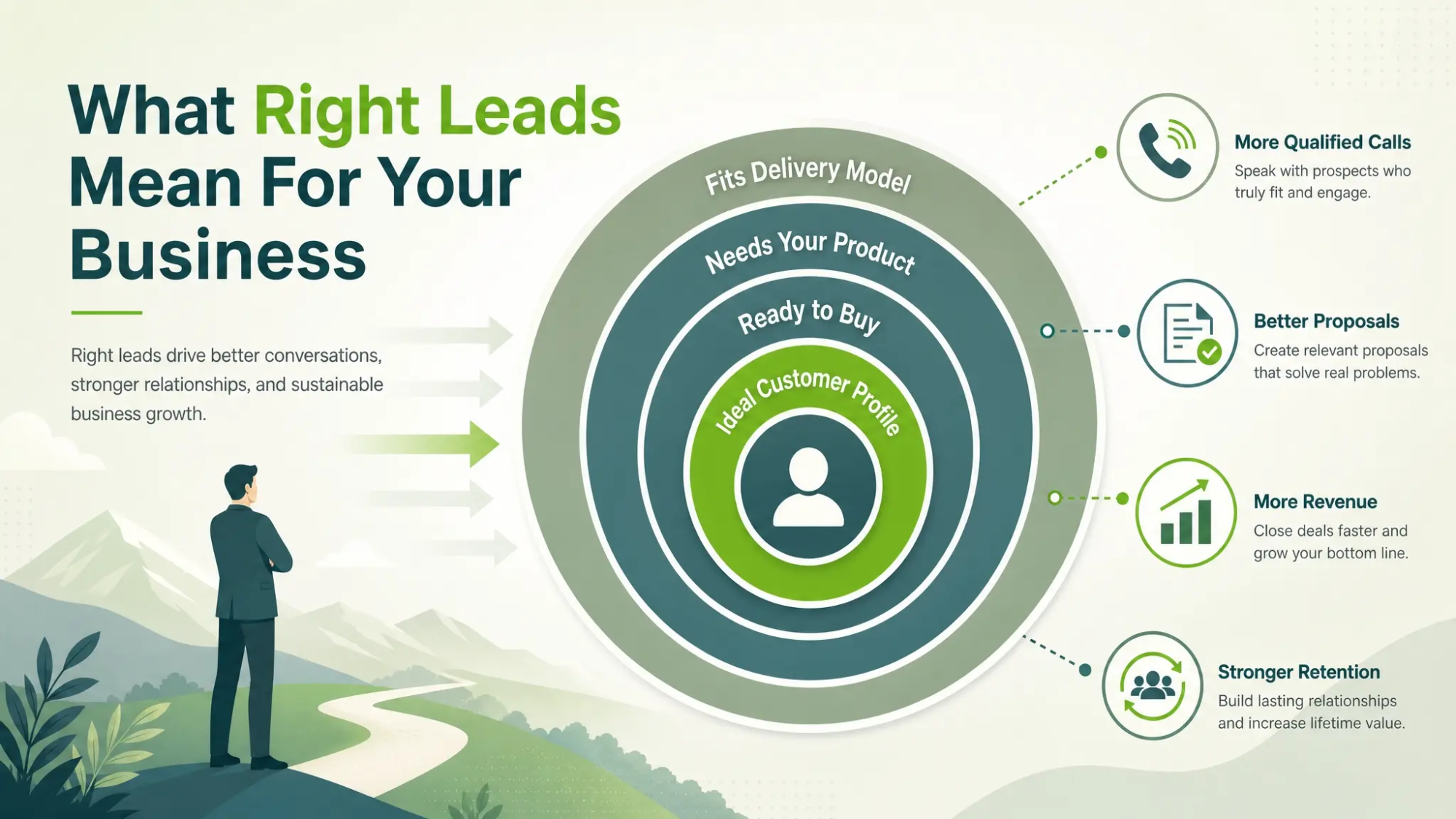
A right lead matches your ideal customer profile and is ready enough to take the next sales step. It is not only someone who fills a form, but someone who can buy, needs what you sell, and fits your delivery model. When those pieces align, lead quality rises and close rates follow.
Define lead quality in plain terms your marketing and sales teams both accept. Tie it to measurable outcomes like qualified calls, proposals sent, revenue won, and retention. That shared definition becomes the standard you optimize toward.
Signs Your Leads Are Not A Good Fit
Bad-fit leads are rarely random. They tend to cluster around specific keywords, geographies, devices, or ad promises that attract curiosity rather than intent. When you spot the patterns, you can cut waste fast without reducing total opportunity.
- Low Sales Acceptance Rate: Leads enter the CRM but sales marks them unqualified or never contacts them because they are clearly off target.
- High No Show Or No Reply: People submit a form but do not answer calls or emails, which often signals low intent or a confusing offer.
- Price Shoppers Only: Conversations focus on the cheapest option and end when your minimums or scope are shared.
- Wrong Location Or Service Area: Leads come from outside your coverage, which often points to loose location settings or broad match drift.
- Mismatch In Needs: Prospects request services you do not provide, which suggests your ad copy and landing page are not specific enough.
Once the symptoms are clear, the next step is tracking the exact sources producing them.
Track Lead Quality Beyond Cost Per Lead
Cost per lead is a volume metric, not a value metric. To improve lead quality, you need to connect Google Ads clicks to what happens after the form submit or call. That requires clean tracking, consistent CRM fields, and a feedback loop with sales.
Start by choosing a small set of quality KPIs and using them in weekly reporting. Keep the definitions stable so trends are trustworthy and optimization decisions are not based on shifting labels.
| Quality Signal | How To Measure | What To Optimize |
|---|---|---|
| Sales Qualified Lead Rate | SQLs divided by total leads | Keywords, match types, and negatives |
| Cost Per Qualified Lead | Spend divided by SQLs | Bids, audiences, and schedules |
| Contact Rate | Leads reached divided by leads received | Forms, call routing, and response time |
| Close Rate | Deals won divided by SQLs | Offer clarity and landing page alignment |
These signals keep the focus on outcomes that matter to revenue, not just on-platform conversion totals.
Keyword Intent And Match Type Control
Most wrong-lead problems begin with intent leakage. Broad match and loosely themed ad groups can pull in research traffic, job seekers, students, or people looking for DIY solutions. You do not need to avoid reach, but you do need guardrails.
Use tighter keyword groupings and watch search terms daily when making changes. Build a negative keyword system that grows over time and is shared across campaigns where it makes sense.
- Commercial Intent Keywords: Prioritize terms that include service qualifiers, urgency, or transactional language tied to your offering.
- Negative Keyword Coverage: Block informational, careers, free, cheap-only, and unrelated service modifiers that repeatedly appear in search terms.
- Match Type Mix: Use exact and phrase for core revenue drivers and test broad only with strong negatives and audience layering.
This approach reduces low-intent entries while keeping enough volume for learning and growth.
Audience Targeting That Filters For Fit
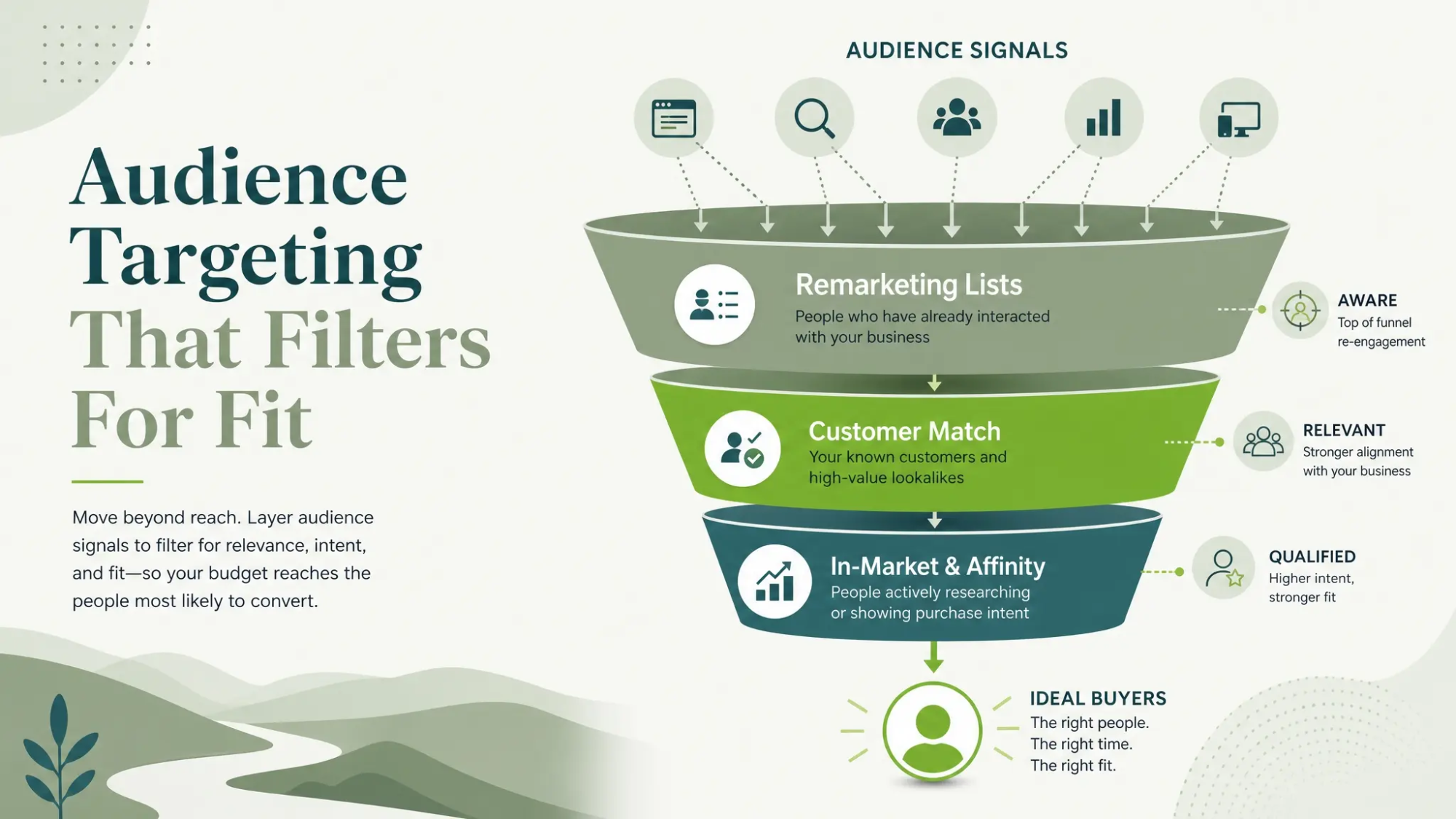
Audience signals help steer Google Ads toward people who behave like buyers. This is especially important when products or services have minimum order sizes, specific industries, or a defined buyer role. When audiences are ignored, campaigns tend to over-serve the easiest clicks rather than the best prospects.
Layer audiences carefully and align them with the buying cycle. Use observation to collect data, then shift to stronger bid adjustments or targeting where the quality data supports it.
- Remarketing Lists: Re-engage visitors who viewed key pages and exclude recent converters to prevent duplicate leads.
- Customer Match: Upload qualified leads or customers to help steer delivery toward similar profiles.
- In Market And Affinity Signals: Use as supporting signals, not as the primary driver, when lead quality is the priority.
Audience work becomes far more effective when conversion tracking distinguishes qualified leads from basic form fills.
Landing Page Alignment And Form Design
Even well-targeted clicks can turn into wrong leads when the landing page is vague. If the page promises too much or feels generic, it attracts people who are not actually eligible or ready. Clarity is the strongest filter you control.
Make your page specific about who you serve, what you do, and what you do not do. Include pricing guidance, service area, minimums, or required qualifications when they are common disqualifiers.
- Offer Specificity: State the exact service or product category and avoid broad claims that invite unrelated requests.
- Qualification Fields: Add one to three fields that confirm fit, such as budget range, timeline, location, or service type.
- Friction With Purpose: Reduce unnecessary fields, but keep enough intent checks to prevent low-quality submissions.
Better form design can lower raw conversion rate but raise revenue per lead, which is the goal.
Conversion Tracking That Rewards Quality
If every form submit is counted equally, automated bidding will chase the easiest conversions. That often means broad terms and low-intent placements that inflate lead volume. You need conversion actions that reflect meaningful progress.
Use separate conversion actions for different lead types and set primary conversions only for actions that correlate with revenue. Where possible, import offline conversion events from your CRM and pass back qualified outcomes to Google Ads.
- Audit Conversion Actions: Remove duplicates and ensure each action reflects a distinct business outcome.
- Set Primary Conversions Carefully: Optimize toward qualified calls, booked meetings, or vetted forms rather than every submission.
- Connect CRM Outcomes: Map lead status fields and feed back SQL or closed-won signals to improve bidding and targeting.
Once conversion priorities match business value, automation starts working for you instead of against you.
Sales And Marketing Feedback Loop
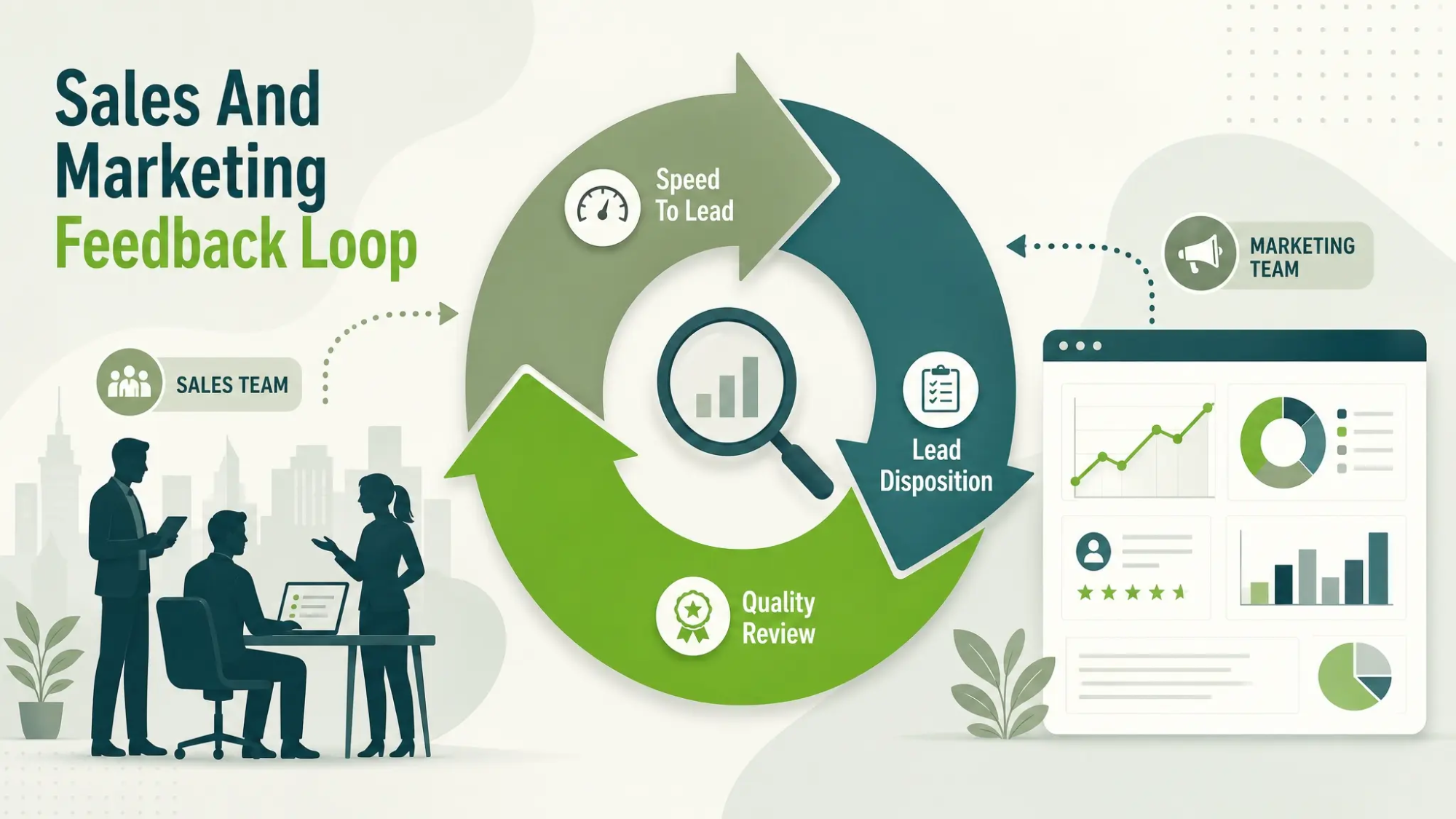
Lead quality is not a Google Ads problem alone. If sales follow-up is slow or inconsistent, good leads decay into missed opportunities and look like poor-quality traffic. Tight coordination protects the signal you are trying to optimize.
Set a shared review cadence and keep it focused on patterns, not anecdotes. The goal is to identify which campaigns generate the best conversations and why.
- Lead Disposition Standards: Use consistent reasons for unqualified outcomes so marketing can make targeted fixes.
- Speed To Lead: Track response time and aim for a process that contacts leads quickly during business hours.
- Call And Form Quality Review: Review a small sample weekly to confirm messaging alignment and spot breakdowns.
These habits turn subjective lead complaints into objective optimization inputs.
How IMILI Can Help You Improve Lead Quality?
When lead volume is strong but quality is inconsistent, the fastest path forward is a structured audit plus ongoing optimization. IMILI works with businesses that want Google Ads performance tied to qualified outcomes, not just clicks and basic conversions. That typically includes account structure improvements, intent-focused keyword and negative strategies, landing page alignment, and conversion tracking that supports revenue goals.
If your team needs a clearer view of which campaigns produce the right leads, IMILI can also help connect marketing data to sales outcomes so optimization decisions are based on qualified lead signals. This is especially useful when multiple lead sources, multiple locations, or multiple services make attribution harder.
Conclusion
Google Ads can generate plenty of leads while still missing the people most likely to buy. The fix is not a single tweak, but a quality-first system that tightens intent, clarifies the offer, and measures what happens after the click. When you optimize for qualified outcomes, lead volume becomes more stable and sales effort goes further.
Start with a shared definition of the right lead, then align keywords, audiences, landing pages, and tracking around it. Once your conversion signals reflect business value, the platform can help scale the results you actually want.
Frequently Asked Questions
Why do I get many leads but few sales from Google Ads?
This usually happens when campaigns optimize for easy conversions instead of qualified outcomes. Broad keyword intent, vague landing pages, and unfiltered forms can inflate lead count without matching your ideal customer profile. Connecting CRM qualification back to Google Ads helps correct the optimization signal.
Should I reduce my budget if lead quality is low?
Not automatically. Start by isolating the sources of poor-fit leads and tightening targeting, match types, and negatives. Budget cuts can hide the problem, while quality-focused changes often improve results at the same spend level.
What is the quickest way to improve lead quality without losing all volume?
Audit search terms and add negatives for repeated low-intent queries, then update ad copy and landing pages to state clear qualifiers. Next, adjust primary conversions so bidding optimizes for actions that correlate with revenue. These changes usually reduce wasted leads while preserving strong intent traffic.